
About
This project demonstrates a simple yet powerful automated accounts receivable system built with n8n. It runs daily, reads all your invoice records from a Google Sheet, intelligently identifies which invoices are due soon (e.g., within 3 days) or already overdue (up to 7 days past due), skips paid invoices, prepares customized reminder messages, and sends professional emails directly from your Gmail account. The result is consistent, timely reminders that improve cash flow, reduce Days Sales Outstanding (DSO), and eliminate the repetitive, error-prone task of manual follow-ups — all while maintaining a friendly and professional tone with clients.
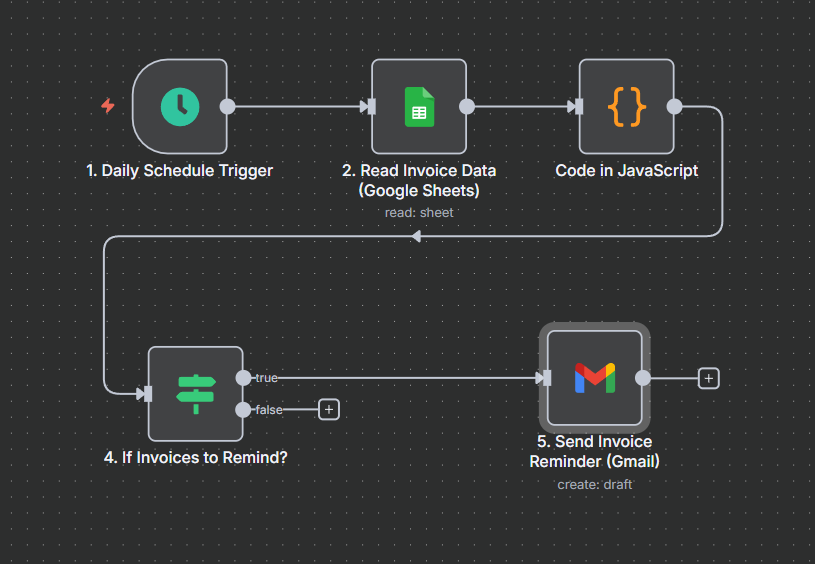
How it works:
The workflow follows a clean, linear daily process:
Daily Schedule Trigger — Runs automatically every 24 hours.
Read Invoice Data (Google Sheets) — Pulls all rows from your specified sheet and range .
Filter & Prepare Reminders — Core logic:
- Normalizes today’s date and each invoice’s DueDate
- Calculates days until / since due date
- Identifies invoices that need attention: • Due soon (≤ 3 days remaining) → friendly pre-due reminder • Overdue (1–7 days late) → more urgent overdue reminder
- Skips invoices marked “Paid” or missing critical fields (email, amount, date)
- Prepares personalized subject line and email body for each qualifying invoice
If Invoices to Remind? (IF node) — Only continues if at least one invoice needs a reminder (prevents unnecessary Gmail calls).
Send Invoice Reminder (Gmail) — For each qualifying invoice, sends a tailored email to the client using the dynamically generated subject and body from step 3.
Key Features:
- Fully Automatic Daily Check — No manual starting required; runs on schedule (timezone adjustable)
- Two-Stage Reminders — Gentle “due soon” notice 3 days before + firmer “overdue” reminder up to 7 days after due date
- Skips Paid Invoices — Automatically ignores entries marked “Paid” in the Status column
- Google Sheets as Single Source of Truth — No extra database needed; just maintain one clean spreadsheet
- Zero Coding After Setup — Once columns and credentials are configured, it runs reliably forever
See Work Flow In Action
For whom this AI automation will benefit?
- Freelancers, solopreneurs, and small agencies who send invoices manually and lose cash flow due to delayed or forgotten client payments.
- Small to medium businesses (SMBs) with accounts receivable responsibilities wanting to eliminate manual chasing while maintaining polite, professional client relationships.
- Service-based companies (consultants, coaches, designers) tracking invoices in Google Sheets and needing automated reminders before/after due dates.
- Finance teams or bookkeepers in growing firms aiming to improve cash flow, reduce DSO (Days Sales Outstanding), and free up time from repetitive follow-ups.